
The Credlab Report
A credit report a person has read before you do.
Plain English. Three numbers up top. The legal record on file, the trade data we already hold and the references we chased behind them. Reviewed and signed by a Credlab credit analyst, back in about 48 hours.
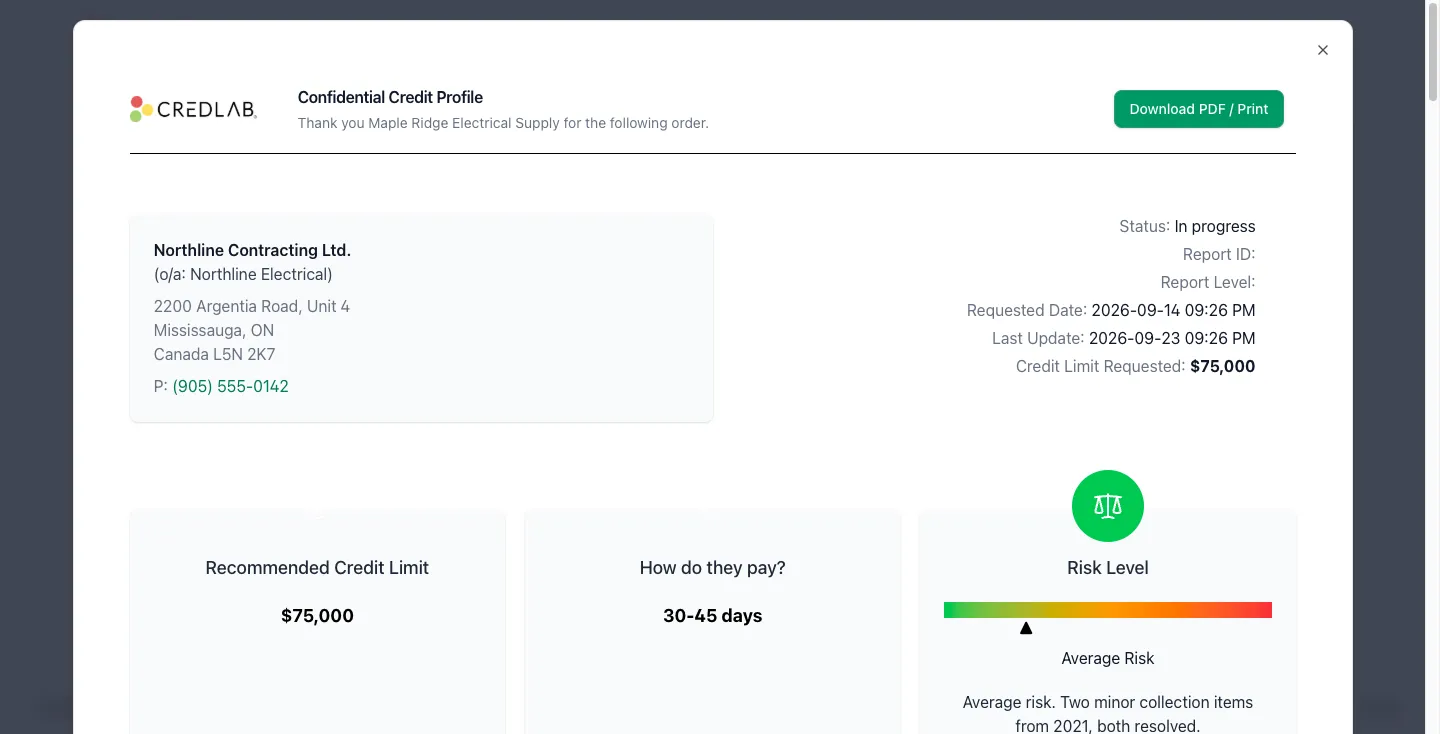
Written to be read
Most business credit reports are built for the database, not the reader: a score, a dozen codes, a page of abbreviations. A Credlab Report opens with the three things you need to make a decision, and then shows you exactly what they're based on, in sentences.
- A suggested credit limit. A figure to work from, with the analyst's reasoning, not just a number.
- When to expect payment. The range of days this company actually pays in, from its trade references and reported payment behaviour.
- A risk level. Low, average or high, with the reasons, in the same three colours you see across Credlab.
What backs it up
- A full legal-name search. We confirm the business is registered, check its status on the registry, and give you the correct legal name to put on every invoice and credit agreement. Get this wrong and the paperwork you'd rely on in a dispute names the wrong company.
- The legal record on file. Suits, judgments, tax liens, UCC filings, collections, returned checks, bankruptcies and sanctions screening: how many, how much, how recent, and the details of each one, so you can see what the risk level is based on. The full list is below.
- Trade data on file, and references chased. References we already hold on the company go in first, before anyone has to ask. Then the ones listed on the credit application, which our analysts call and chase. Every reply and call note lands in the file, and any reference that can't be reached is noted in the report.
- Bank verification, where the applicant consents. Account holder, balance, up to 24 months of transactions, average monthly deposits and withdrawals and NSF counts, through Plaid. See how verification works.
- Stability. Years in business, ownership and the company's history.
The legal section, line by line
Every report opens its legal section with a summary: for each category below, the number of items on file, the total amount and the date of the most recent one, plus a total across all of them. Then each item is listed with its details. The overview lines at the top of every report show suits, judgments, collections, NSF and security filings at a glance.
- Legal suits. Who is suing the company and for how much: filed and reported dates, plaintiff and defendant, the court and where it sits, the claim number, the reason, the case details and the current status.
- Judgments. Civil, small claims and default judgments, plus releases and dismissals: the amount and currency, who obtained it against whom, the court and its contact details, the filing number, the reason and the status.
- Tax liens and UCC filings. Federal, state, county and municipal tax liens and tax warrants, including releases, plus every UCC filing as it is filed, continued, amended, assigned or terminated: filing number, jurisdiction, debtor, secured party and collateral. Higher-risk filings, such as a blanket lien on all assets or a cluster of filings in a short period, are called out as cautionary.
- Bankruptcies. Chapter 7, Chapter 11 and other filings, petitions and discharges. Filed and discharge dates, the court and case numbers, the trustee or receiver and their contact details, the law firm, hearing and creditor-meeting dates, and the asset value, liability value and dividends.
- Collections. Every account placed for collection: debtor, creditor and the agency, claim date and amount, balance and amount paid, and the status, from placed for collection through partial payment, settlement, paid in full or closed uncollected.
- Returned checks (NSF). How many, for how much and how recently. NSF activity appears in the overview lines of every report, alongside suits, judgments, collections and security filings.
- Sanctions screening. Whether the business or its principals appear on US sanctions or watch lists, with the record name, alternate names, address and the sanctions program.
Our analyst leads. AI assists. Your credit manager decides.
A Credlab credit analyst, a professional who has spent their career in commercial credit, runs every file: pulling the records, calling and chasing the references, reading the public record and the bank verification, and writing the report. Along the way they use a set of tools, AI among them, to assemble the file, draft the write-up and score the risk. What they sign is their own work. Think of them as the credit expert on your team, without adding headcount. Everything the tools produce goes through the analyst first, except the bank analysis, which is generated with AI from the Plaid data and labelled as such. The software never presses "approve."
Coverage and ordering
We report on US businesses and on international companies when a file needs one. Reports are ordered from inside a credit file in a couple of clicks, or on their own without a subscription. Pay as you go, or pre-pay a bulk number for a discount. Scheduled updates keep watch on the accounts you've opened after the decision.
Order your first report today. Start a 30-day free trial, or send us a company name and we'll take it from there.
Questions we get asked
How long does a report take?
Turnaround averages 48 hours. A Credlab analyst reviews and signs every report before it's delivered, so it isn't instant, and it isn't a database dump either.
Is the report generated by AI?
A Credlab credit analyst leads every report: they pull the records, chase the references, read the public record and write it up. AI is one of the tools they use along the way, to assemble the file, draft the write-up and score the risk. Everything the tools produce goes through the analyst, except the bank analysis, which is generated with AI from the Plaid data and labelled as such. The analyst signs the report.
Do the reports include bankruptcies and judgments?
Yes. The legal section lists suits, judgments, tax liens, UCC filings, collections, returned checks, bankruptcies and sanctions screening, each with a count, the total amount on file and the most recent date, and then every item with its details.
What trade data is on file before we order?
References Credlab already holds on the company go into the report first, before anyone has to ask. Then the references listed on the credit application, which our analysts call and chase; any that can't be reached are noted in the report. Reported payment behaviour from both feeds the payment window and the suggested limit.
How is this different from our credit bureau subscription?
A bureau lookup is a database record. A Credlab Report is a fresh investigation of the company written in plain English by a credit analyst: a suggested limit, a payment window and a risk level, with the legal record and the references that back them up, in the same file as the application.
Do we need the Credlab platform to order reports?
No. You can order reports on their own and pay per report. If you extend credit regularly, the platform keeps every report, application and decision on a company in one file.
Which companies can you report on?
US businesses, plus international companies when a file needs one. How much is on file varies from company to company.
How do we pay?
Pay as you go, or pre-pay a bulk number of reports for a discount. Reports are priced in USD.
Your first analyst-reviewed credit report, back in about 48 hours.
Start a 30-day free trial, or bring two or three real applications to a demo and we'll walk them through Credlab end to end.